I've sat through enough open houses to know what happens to printed property brochures.
They get picked up at the door. Folded in half and stuffed into a bag. Pulled out three days later, slightly crumpled, next to a grocery receipt. By that point the prospect has toured six other properties and can barely remember which house had the weird kitchen layout.
I stopped printing them two years ago. Haven't looked back once.
What a Digital Property Brochure Actually Is
Not a PDF. Not a photo gallery. Not a Zillow listing with extra steps.
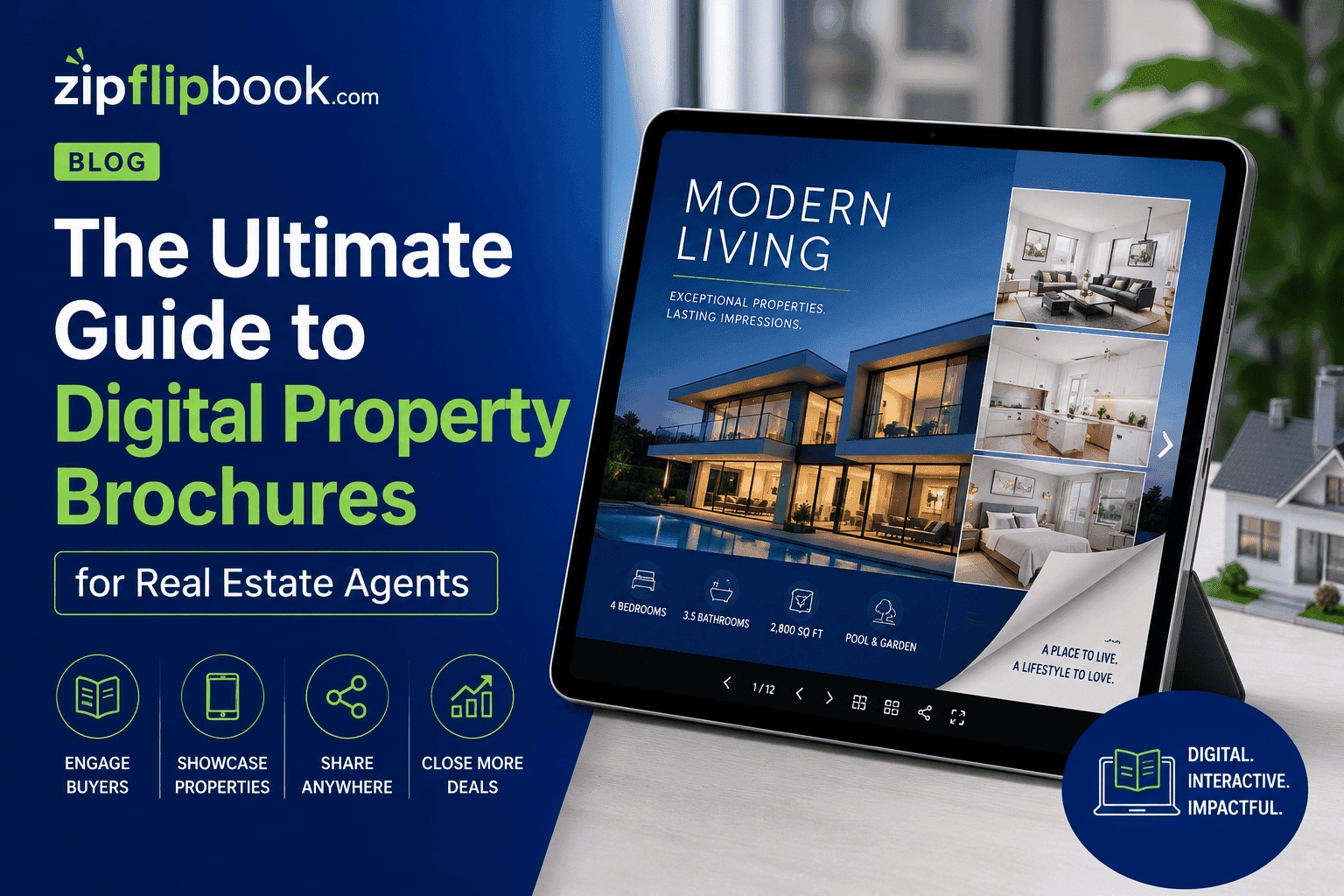
It's an interactive document that opens in one click — on a phone, a laptop, a tablet, wherever the buyer happens to be. Pages flip. Photos load crisply. Floor plans are zoomable. Video tours play inline. Links to the school district, the neighborhood walkability score, the commute calculator — all clickable without leaving the document.
It looks like something a luxury real estate brand would produce. And with platforms like ZipFlipbook, any agent can publish one for free in about ten minutes. No design team. No marketing budget. Upload a PDF, get a link, done.
Turn Your PDFs into Lead Generation Machines
Start getting highly-qualified leads from your PDFs and landing pages today. It takes exactly 2 minutes to set up.
No credit card required • Sign up in 10 seconds
Why the Format Works for Real Estate Specifically
It's the biggest financial decision most people make in their lives. They don't decide in a day. They compare. They revisit. They send listings to their partner, their parents, their friends. They come back to a property they looked at three weeks ago and see it differently the second time.
A buyer opened one of my brochures six times over two weeks before booking a showing. Six times. A printed brochure gets opened once, if you're lucky — and that's assuming they didn't leave it in the car.
A digital brochure lives at a permanent URL. Send it once and it goes everywhere the buyer goes. They pull it up at dinner to show their spouse. They share it in a WhatsApp group. They open it the night before they're supposed to make a decision. Every time it loads exactly as good as the first time — no crumpling, no fading, no "sorry, I can't remember which one that was."
Buyers share these without being asked. Not because you asked. Because it's easier than explaining the property to their partner over the phone.
What to Put Inside a Digital Property Brochure
Don't treat this like an MLS listing sheet. That's not a brochure. That's a data entry form.
A digital property brochure tells a story. I usually aim for 6 to 8 pages. Sometimes a condo needs 4. A horse property with outbuildings and acreage might need 12. Adjust as you go — there's no rule that says every listing gets the same page count.
Here's roughly how I structure mine.
Page One: One Photo, Nothing Else
One stunning photo. The address. The price. That's it. First impressions work on scarcity — crowd the opening page and you've lost the reader before you've earned them. I put the kitchen photo on page one for a listing last spring. Got three showing requests the next day. That's not a coincidence.
Pages Two and Three: The Property at Its Best
Your best photography. Not all of it — the best of it. Buyers make emotional decisions before rational ones. These pages are for the emotion. Show the kitchen in the morning light. Show the backyard in summer. Show the view from the master bedroom window. If you have a video walkthrough, embed it here.
Page Four: The Specs
Now you've earned the right to be detailed. Bedrooms, bathrooms, square footage, lot size, year built, parking, HOA fees. Floor plan if you have one — and you should always have one, because buyers mentally move their furniture in before they ever visit in person.
Page Five: The Neighborhood
This is the most underused page and the one that converts best with serious buyers. Schools with ratings. Distance to the nearest grocery store, coffee shop, gym. Commute time to the major employment centers. Walkability score. What's coming to the area that isn't on Zillow yet.
Buyers aren't just buying a house. They're buying a life. Show them what that life looks like on a Tuesday morning.
Page Six: The Agent — With Numbers, Not Adjectives
Your photo. Your name. Your actual track record. Not "passionate and dedicated to getting you results." Something like: "Sold 47 properties in this zip code in the last 24 months. Average days on market: 11. Listed at $X, sold at $Y."
Numbers build trust faster than adjectives. Every agent claims to be passionate. Almost none of them show their numbers.
Last Page: One Call to Action
Not three options. One. Book a showing. Call this number. Reply to this email. Make it obvious. Make it impossible to miss.
How This Changes the Listing Appointment
One thing I learned the hard way: digital brochures aren't just for buyers. They change the listing appointment with sellers too.
I showed a seller a digital brochure I'd made for their neighbor's house. They signed on the spot. Didn't haggle on commission. Didn't ask to "think about it overnight." They saw what the marketing would look like — actually saw it, not a promise of it — and that was enough.
Most agents bring a CMA and a generic one-pager about their services. You bring proof of what the marketing looks like before you're even hired. That's a completely different conversation, and sellers notice immediately.
Using Brochures for Lead Generation (Not Just Listing Marketing)
Most agents think about property brochures as a tool for active listings only. That's leaving most of the value on the table.
Create a neighborhood guide as a digital brochure. "The Complete Buyer's Guide to [Your Neighborhood]" — recent sale prices, market trends, school ratings, what's coming to the area, the things only a local agent would actually know. Publish it on ZipFlipbook with an email gate after page three. Run a small targeted ad pointing to that brochure.
The people who give you their email to keep reading are exactly who you want to be talking to. They're researching a specific neighborhood. They're warm. They're not random clicks — they've self-selected as active buyers in your market.
That system works whether you have a listing or not. It builds your pipeline during slow months. It positions you as the local expert before a buyer contacts another agent. And it costs almost nothing because ZipFlipbook is free.
How to Actually Get the Brochure in Front of People
I tried Facebook ads with these early on. Didn't work — too much friction between the ad and the actual decision to engage. Texting my buyer list with a direct link worked immediately. That's where I'd focus first.
A few other things that actually move the needle:
Text it, don't email it. SMS open rates are dramatically higher. A short text with a link gets seen. A PDF attachment to an email often doesn't even get opened.
Send it to buyer's agents. They're your best referral source for specific listings. A digital brochure they can forward directly to their clients without any friction makes the referral easier for them and better for the buyer.
Post it on social with a specific hook. Not "New listing — 3 bed, 2 bath." Post the one genuinely interesting thing about the property. The kitchen with the original 1940s terrazzo floor. The backyard that backs onto a protected greenbelt. Lead with the specific detail, then drop the link.
Don't save this for luxury listings either. Try it on a $300k condo first. The buyers for entry-level properties are often first-time buyers who share everything with their family. Those referral opens are free marketing you didn't have to work for.
What Makes ZipFlipbook the Right Tool for This
It's free with no watermark. For an agent publishing brochures regularly, a platform that charges per publication adds up fast. ZipFlipbook doesn't charge anything and doesn't put their branding on your document.
It's fast. Upload a PDF and have a live link in under two minutes. In real estate, speed matters. A listing that hits the market Friday afternoon needs marketing that's live Friday evening.
The mobile experience is clean. More than 60% of property searches happen on mobile. A brochure that looks great on desktop and terrible on an iPhone fails most of the time. ZipFlipbook handles mobile well.
The link is permanent. No expiration dates. No "this link has expired" messages three weeks after you send it. The brochure lives at its URL for as long as you need it.
Turn Your PDFs into Lead Generation Machines
Start getting highly-qualified leads from your PDFs and landing pages today. It takes exactly 2 minutes to set up.
No credit card required • Sign up in 10 seconds
Mistakes That Kill Otherwise Good Brochures
Low-quality photography. The format amplifies whatever photos you put in it. Great photos look spectacular. Bad photos look worse. Fix this before everything else — nothing else matters if the photography is weak.
Skipping the neighborhood page. Every buyer wants to know what it's like to live there. The agents who include this page consistently book more showings than the ones who don't.
No call to action at the end. I've seen beautifully designed brochures that end with a photo of the backyard and nothing else. No phone number. No email. No instruction. Don't make the buyer work to figure out how to reach you.
Not updating it. Price reduction? New staging photos? Open house this weekend? Update the brochure. The link stays the same. Takes five minutes.
Frequently Asked Questions
Do buyers actually read these or just scroll MLS listings?
Yes, if you make them worth reading. No, if you just dump the MLS listing into a fancy format. The agents getting results from digital brochures are the ones treating them as actual marketing — curated photography, a neighborhood section, a real call to action. The ones who copy-paste their listing description and add a logo are the ones who think these don't work.
How long should a property brochure be?
Six to eight pages for most listings. A condo might need four. A rural property with acreage, outbuildings, and income potential might need twelve. Don't pad it to hit a number. Every page should give the buyer a reason to keep going.
Can I use the same template for every listing?
Yes, and you should. Consistency builds brand recognition. Buyers who've seen your brochures before recognize the format immediately — that repetition signals volume and professionalism. Swap the property-specific content. Keep the structure.
What if I'm not a designer?
Build it in Canva. They have real estate templates that take 20 minutes to customize. Export as PDF. Upload to ZipFlipbook. The platform handles the interactive layer. You're responsible for the content and photos. That's it.
Is ZipFlipbook actually free?
Yes. No watermark, no expiration, no per-publication fee. Upload a PDF, get a link, share it. The free version does everything in this guide.
Turn Your PDFs into Lead Generation Machines
Start getting highly-qualified leads from your PDFs and landing pages today. It takes exactly 2 minutes to set up.
No credit card required • Sign up in 10 seconds
The Bottom Line
Try this on your next listing. If your showing requests don't go up, I'm wrong. But I've used digital brochures on 11 listings in a row now and I'm not going back to paper.
The printed brochure had a good run. But it was designed for a world where buyers made decisions at the open house. That world doesn't exist anymore. Decisions happen at 11pm, on a couch, in a group chat, three weeks after the showing.
Your marketing needs to travel with the buyer. ZipFlipbook is free, takes ten minutes to learn, and works on every device. Start with your next listing.
The gap between what you're sending now and what you could be sending is smaller than you think — and the difference it makes isn't.